本文系转载
写在前面的话标准非实际情况。
ECMAScript 2019,ECMA-262 标准版本的第19版(通常称为ES2019或ES10),于 2019 年 6 月完成。
This specification, the 10th edition, introduces a few new built-in functions:
flatandflatMaponArray.prototypefor flattening arrays,Object.fromEntriesfor directly turning the return value ofObject.entriesinto a new Object, andtrimStartandtrimEndonString.prototypeas better-named alternatives to the widely implemented but non-standardString.prototype.trimLeftandtrimRightbuilt-ins. In addition, this specification includes a few minor updates to syntax and semantics. Updated syntax includes optional catch binding parameters and allowing U+2028 (LINE SEPARATOR) and U+2029 (PARAGRAPH SEPARATOR) in string literals to align with JSON. Other updates include requiring thatArray.prototype.sortbe a stable sort, requiring that JSON.stringify return well-formed UTF-8 regardless of input, and clarifyingFunction.prototype.toStringby requiring that it either return the corresponding original source text or a standard placeholder.
ES10中除了 Object.fromEntries大多数功能已经在 Chrome中实现,所以你为什么不尽早开始探索它呢?当所有浏览器开始支持它时,你已经获得了领先优势,这只是时间问题。对于有兴趣探索ES10的人来说,这是一份 非外星人指南。
ES10在新语言功能方面没有ES6那么重要,但它确实添加了一些有趣的东西(其中一些在目前版本的浏览器中还不起作用:02/20/2019)
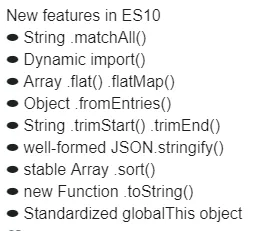
ES6中最受欢迎的功能莫过于箭头函数了,那么 ES10中呢?
BigInt - 任意精度整数
BigInt是第7种原始类型。
BigInt是一个任意精度的整数。这意味着变量现在可以代表2^53个数字。而且最大限度是9007199254740992。
1
const b = 1n; //追加n来创建一个BigInt
在过去的整数值大于9007199254740992不支持。如果超出,则该值将锁定为 MAX_SAFE_INTEGER + 1:
1 |
const limit = Number.MAX_SAFE_INTEGER; |
typeof
1
2
3
4
5
typeof 10;
// 'number'

typeof 10n;
// 'bigint'
=== ==
1
2
3
4
5
10n === BigInt(10);
// true

10n == 10;
// true
* /
1
2
3
4
5
6
200n / 10n
// 20n

200n / 20
// Uncaught TypeError:
// Cannot mix BigInt and other types, use explicit conversions
- +
1
2
3
4
5
6
-100n
// -100n

+100n
// Uncaught TypeError:
// Cannot convert a BigInt value to a number
string.prototype.matchAll()
当你读到这个 matchAll时,它可能会在 Chrome C73中正式实现 - 如果没有,它仍然值得一看。特别是如果你是一个正则表达式瘾君子。
如果你谷歌搜索”javascript string match all”,第一条结果可能会是这样的How do I write a regular expression to “match all”?。 排名靠前的结果会建议你使用 String.match匹配的时候在正则表达式或者 RegExp.exc 或者 RegExp.text后加上 /g…
首先,我们来看下旧的规范是如何运行的。
String.match, match只返回字符串参数第一个符合匹配的。
1 |
let string = 'Hello' |
匹配的结果是单个 'l'。(注意: match匹配的结果存储在 matches[0]而非在 matches),在字符串 'hello'中搜索匹配 'l'只有 'l'被返回来。使用 regexp参数也是得到一样的结果。
我们把字符 'l'更换为表达式 /l/:
1 |
let string = 'Hello' |
添加 /g
String.match使用正则表达式带上 /g标签会返回多个匹配。
1 |
let string = 'Hello' |
Great…在低于 ES10的环境中我们得到了多个匹配结果,并且一直有效。
那么为什么要用全新的 matchAll方法呢?在我们更详细地回答这个问题之前,让我们来看看 capture group。如果不出意外,你可能会学到新的有关正则表达式的东西。
正则表达式捕获组
在正则表达式中捕获组只是在 ()括号中提取匹配。你可以从 /regex/.exec(string)和 string.match捕获组。
通常捕获组是在匹配规则中被创建的。输出对象上创建 groups属性如: (?<name>)。要创建一个新的组名,只需在括号内添加 (?<name>)属性,分组(模式)匹配将成为附加到 match对象的 groups.name。
看一个实际的例子
字符串标本匹配

创建match.groups.color & match.groups.bird匹配:
1 |
const string = 'black*raven lime*parrot white*seagull' |
需要多次调用regex.exec方法来遍历整个搜索结果。在每次迭代调用.exec时,会显示下一个结果(它不会立即返回所有匹配项)。
控制台输出:
1 |
black*raven at 0 with 'black*raven lime*parrot white*seagull' |
这里有一个怪事:
如果你从这个正则表达式中删除/ g,你将永远在第一个结果上创建一个无限循环循环。这在过去是一个巨大的痛苦。想象一下从某个数据库接收正则表达式,你不确定它是否在最后有/ g。你必须先检查它,等等。
现在我们有足够的背景知识回答这个问题:
最好使用 .matchAll()
- 使用捕获组时更加优雅。捕获组知识带有提取模式()的正则表达式的一部分。
- 它返回一个迭代器而不是数组,迭代器本身很有用。
- 可以使用扩展运算符…将迭代器转为数组。
- 它避免使用带
/g标志的正则表达式…当从数据库或外部源检索未知的正则表达式并与古老的RegEx对象一起使用时非常有用。 - 使用
RegExp对象创建的正则表达式不能使用点(.)运算符链接。 - 高级:RegEx对象跟踪最后匹配位置的内部
.lastIndex属性,这可能对复杂案例有破坏性的事情。
.matchAll()如何工作
这是一简单个例子。
我们尝试匹配字符串Hello的所有e和l。因为返回了iterator,所以我们用for ... of处理它。
1
2
3
4
5
// Match all occurrences of the letters: 'e' 或者 'l'
let iterator = 'hello'.matchAll(/[el]/)
for (const match of iterator) {
console.log(match)
}
如上,你可以跳过/g,.matchAll不需要它。结果:
1
2
3
[ 'e', index: 1, input: 'hello' ] // Iteration 1
[ 'l', index: 2, input: 'hello' ] // Iteration 2
[ 'l', index: 3, input: 'hello' ] // Iteration 3
使用.matchAll()捕获组示例:.matchAll()具有上面列举的所有好处,它是一个迭代器,所以我们可以用它来循环,这就是整个句法差异。
1
2
3
4
5
6
7
8
9
10
const string = 'black*raven lime*parrot white*seagull';
const regex = /(?<color>.*?)\*(?<bird>[a-z0-9]+)/;
for (const match of string.matchAll(regex)) {
let value = match[0];
let index = match.index;
let input = match.input;
console.log(`${value} at ${index} with '${input}'`);
console.log(match.groups.color);
console.log(match.groups.bird);
}
注意去掉/g标志,因为.matchAll()已经隐含了它。
结果输出:
1
2
3
4
5
6
7
8
9
black*raven at 0 with 'black*raven lime*parrot white*seagull'
black
raven
lime*parrot at 11 with 'black*raven lime*parrot white*seagull'
lime
parrot
white*seagull at 23 with 'black*raven lime*parrot white*seagull'
white
seagull
也许在美学上它与循环实现时的原始regex.exec非常相似。但如前所述,由于上述许多原因,这是更好的方法。并且删除/g不会导致无限循环。
动态 import
现在可以将导入分配给一个变量:
1
2
3
4
element.addEventListener('click', async () => {
const module = await import('./api-scripts/button-click.js')
module.clickEvent()
})
Array.flat()
扁平化多维数组:
1
2
3
4
5
let multi = [1,2,3,[4,5,6,[7,8,9,[10,11,12]]]];
multi.flat(); // [1,2,3,4,5,6,Array(4)]
multi.flat().flat(); // [1,2,3,4,5,6,7,8,9,Array(3)]
multi.flat().flat().flat(); // [1,2,3,4,5,6,7,8,9,10,11,12]
multi.flat(Infinity); // [1,2,3,4,5,6,7,8,9,10,11,12]
Array.flatMap()
1 |
let array = [1, 2, 3, 4, 5] |
变为:
1
2
3
4
5
6
[Array(2), Array(2), Array(2)]
0: (2)[1, 2]
1: (2)[2, 4]
2: (2)[3, 6]
3: (2)[4, 8]
4: (2)[5, 10]
再次扁平化数组:
1
2
array.flatMap(v => [v, v * 2])
[1, 2, 2, 4, 3, 6, 4, 8, 5, 10]
Object.fromEntries()
将键值对列表转换为对象。
1
2
3
4
5
6
7
8
9
let obj = { apple : 10, orange : 20, banana : 30 };
let entries = Object.entries(obj);
entries;
(3) [Array(2), Array(2), Array(2)]
0: (2) ["apple", 10]
1: (2) ["orange", 20]
2: (2) ["banana", 30]
let fromEntries = Object.fromEntries(entries);
{ apple: 10, orange: 20, banana: 30 }
String.trimStart() & String.trimEnd()
1 |
let greeting = " Space around "; |
格式良好的JSON.stringify()
此更新修复了字符U + D800到U + DFFF的处理,有时可以进入JSON字符串。这可能是一个问题,因为JSON.stringify可能会返回格式化为没有等效UTF-8字符的值的这些数字。但JSON格式需要UTF-8编码。
JSON 对象可用于解析JSON 格式(但也更多。)JavaScript JSON 对象也具有stringify和parse方法。
该解析方法适用于一个结构良好的JSON字符串,如:
1
'{ "prop1" : 1, "prop2" : 2 }'; // A well-formed JSON format string
请注意,创建具有正确JSON格式的字符串绝对需要使用围绕属性名称的双引号。缺少...或任何其他类型的引号将不会产生格式良好的JSON。
1
'{ "prop1" : 1, "meth" : () => {}}'; // Not JSON format string
JSON 字符串格式是不同的,从对象文本 ……它看起来几乎相同,但可以使用任何类型的周围属性名称的报价,还可以包括方法(JSON格式不允许的方法):
1
let object_literal = { property:1,meth:()=> {} };
无论如何,一切似乎都很好。第一个示例看起来合规。但它们也是简单的例子,大部分时间都可以毫无障碍地工作!
U + 2028和U + 2029字符
这是捕获。ES10之前的EcmaScript实际上并不完全支持JSON格式。在ES10之前的时代,不接受未转义的行分隔符U + 2028和段落分隔符U + 2029字符:

U + 2029是行分隔符。

U + 2029是段落分隔符。有时它可能会潜入您的JSON格式字符串。
对于U + D800 - U + DFFF之间的所有字符也是如此
如果这些字符悄悄进入你的JSON格式的字符串(比如说来自数据库记录),你最终可能花费数小时试图弄清楚为什么程序的其余部分会产生解析错误。
所以,如果你传递的eval一个字符串,像“console.log('hello')”这将执行JavaScript语句(试图通过字符串实际代码转换。)这也类似于如何JSON.parse将处理您的JSON字符串。
稳定的Array.prototype.sort()
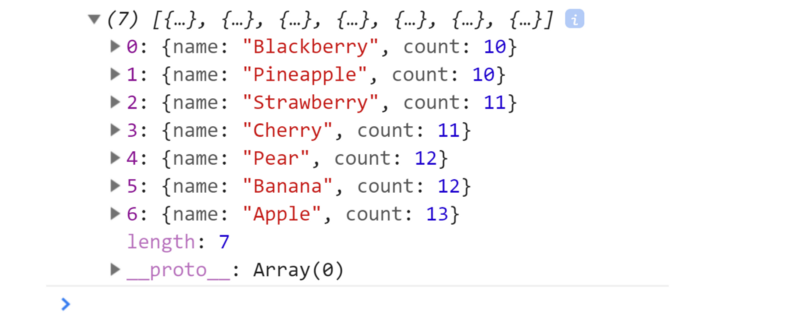
V8的先前实现对包含10个以上项的数组使用了不稳定的快速排序算法。
一个稳定的排序算法是当两个具有相等键的对象在排序输出中以与未排序输入中出现的顺序相同的顺序出现时。
但现在已经不是这样了。ES10提供稳定的阵列排序:
1
2
3
4
5
6
7
8
9
10
11
12
13
14
var fruit = [
{ name: "Apple", count: 13, },
{ name: "Pear", count: 12, },
{ name: "Banana", count: 12, },
{ name: "Strawberry", count: 11, },
{ name: "Cherry", count: 11, },
{ name: "Blackberry", count: 10, },
{ name: "Pineapple", count: 10, }
];
// Create our own sort criteria function:
let my_sort = (a, b) => a.count - b.count;
// Perform stable ES10 sort:
let sorted = fruit.sort(my_sort);
console.log(sorted);
复控制台输出(项目以相反的顺序出现):
New Function.toString()
Funcitons是对象,每个对象都有个.toString()方法因为它最初存在于Object.prototype.toString()。所有的objects(包括functions)都继承至基于原型的类继承。这意味着我们已经有了function.toString()方法了。
但是ES10进一步尝试标准化所有对象和内置函数的字符串表示。以下新案例:
Classic example
1 |
function () { console.log('Hello there.'); }.toString(); |
控制台输出(字符串格式的函数体:)
1
⇨ function () { console.log('Hello there.'); }
以下是其它案例:
直接来自函数名
1 |
Number.parseInt.toString(); |
绑定上下文
1
2
function () { }.bind(0).toString();
⇨ function () { [native code] }
内置可调用函数对象
1
2
Symbol.toString();
⇨ function Symbol() { [native code] }
动态生成的函数
1
2
Function().toString();
⇨ function anonymous() {}
动态生成的生成器 function*
1
2
function* () { }.toString();
⇨ function* () { }
prototype.toString
1
2
Function.prototype.toString.call({});
⇨ Function.prototype.toString requires that 'this' be a Function"
可选的Catch Binding
在过去,try / catch语句中的catch子句需要一个变量。
try / catch语句帮助我们拦截在终端层面的错误:
这是一个复习:
1 |
try { |
但在某些情况下,所需的error变量未被使用:
1 |
try { |
编写此代码的人尝试通过强制为true退出try子句。但是……事实并非如此(正如 Douglas Massolari.所说)。
1 |
(() => { |
在ES10中,Catch Error Binding是可选的
你现在可以跳过error变量:
1 |
try { |
标准化的 globalThis 对象
ES10之前全局this没有标准化。
生产代码中,你必须手动添加如下代码来标准化多个平台的全局对象。
1 |
var getGlobal = function () { |
但即使这样也并不总是奏效。所以ES10添加了globalThis对象,从现在开始应该在任何平台上访问全局作用域:
1 |
// Access global array constructor |
Symbol.description
description 是一个只读属性,返回Symbol 对象的可选描述。
1 |
let mySymbol = 'My Symbol'; |
Hashbang 语法
shebang unix用户会熟悉AKA。
它指定一个解释器(什么将执行您的JavaScript文件?)
ES10标准化了这一点。我不会详细介绍这个,因为这在技术上并不是一个真正的语言功能。但它基本上统一了JavaScript在服务器端的执行方式。
1 |
./index.js |
代替:
1 |
node index.js |
在类Unix操作系统下。
ES10 Classes: private, static & public members
新的语法字符#(hash tag)现在直接在类主体作用域以及constructor和类方法里被用来定义variables, functions,getters和setters
这是一个相当无意义的示例,仅关注新语法:
1 |
class Raven extends Bird { |

总结与反馈
ES10是一套尚未有机会在生产环境中进行全面探索的新功能。如果您有任何更正,建议或任何其他反馈,请告诉我们。
我经常写一个教程,因为我想自己学习一些科目。这是其中一次,有其他人已经编译的资源的帮助:
感谢Sergey Podgornyy写了这篇ES10教程。 感谢 Selvaganesh写了这篇ES10教程。
参考
ecma-262-10.0
【译】ES10功能完全指南
(
https://juejin.im/post/5c7c8e125188256365101c34)