防止垂直margin重叠

垂直margin重叠

什么是垂直margin重叠

如下图,父元素没有设置margin-top,而子元素设置了margin-top:20px;可以看出,父元素也一起有了边距。
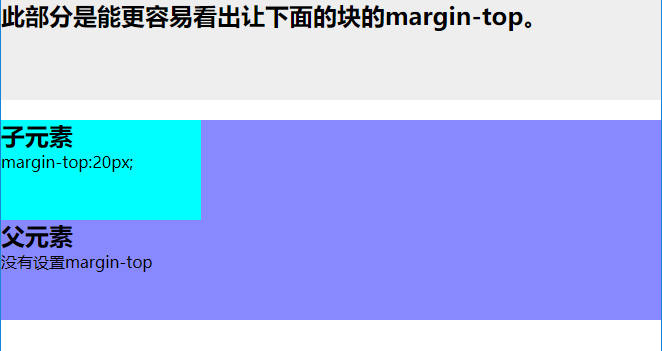
012

上图的代码

1
2
3
4
5
6
7
8
9
10
11
12
13
14
15
16
17
18
19
20
21
22
23
24
25
26
27
28
29
30
31
32
33
34
35
36
37
38
39
40
<!DOCTYPE html>
<html lang="en">
<head>
<meta charset="UTF-8">
<title>Document</title>
<style>
*{
margin:0;
padding:0;
}
.demo{
height:100px;
background: #eee;
}
.parent{
height:200px;
background: #88f;
}
.child{
height:100px;
margin-top:20px;
background: #0ff;
width:200px;
}
</style>
</head>
<body>
<section class="demo">
<h2>此部分是能更容易看出让下面的块的margin-top。</h2>
</section>
<section class = "parent">
<article class="child">
<h2>子元素</h2>
margin-top:20px;
</article>
<h2>父元素</h2>
没有设置margin-top
</section>
</body>
</html>

垂直margin重叠解决方案(BFC)

首先要明确BFC是什么意思,其全英文拼写为 Block Formatting Context 直译为“块级格式化上下文”

参考理解BFC

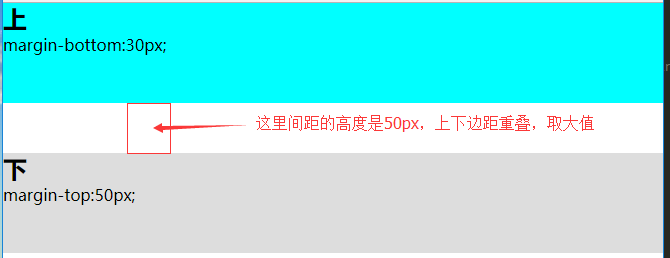
看一个垂直margin重叠例子

1
2
3
4
5
6
7
8
9
10
11
12
13
14
15
16
17
18
19
20
21
22
23
24
25
26
27
28
29
30
31
32
33
34
35
<!DOCTYPE html>
<html lang="en">
<head>
<meta charset="UTF-8">
<title>Document</title>
<style>
*{
margin:0;
padding:0;
}
.top{
background: #0ff;
height:100px;
margin-bottom:30px;
}
.bottom{
height:100px;
margin-top:50px;
background: #ddd;
}
</style>
</head>
<body>

<section class="top">
<h1></h1>
margin-bottom:30px;
</section>
<section class="bottom">
<h1></h1>
margin-top:50px;
</section>

</body>
</html>

效果图

013

用bfc可以解决垂直margin重叠的问题

关键代码

1
2
3
4
5
6
7
8
9
10
11
12
<section class="top">
<h1></h1>
margin-bottom:30px;
</section>

<!-- 给下面这个块添加一个父元素,在父元素上创建bfc -->
<div style="overflow:hidden">
<section class="bottom">
<h1></h1>
margin-top:50px;
</section>
</div>

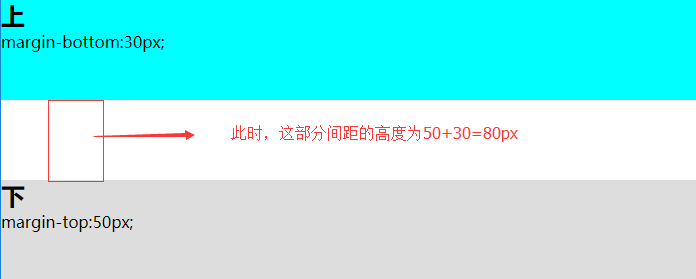
效果图

014

这里只应用了产生BFC的overflow: hidden,可以尝试理解BFC中提到的更多方式

如果重叠发生在父子元素上,可在父元素上使用此方法

垂直margin重叠解决方案(非BFC)

  1. 给父元素加边框border (副作用)

  2. 给父元素设置padding值 (副作用)

  1. 父元素加前置内容生成。
1
2
3
4
5
6
7
8
9
10
11
12
13
14
15
16
.parent {
width : 500px;
height : 500px;
background-color : red;
}
.parent::before, .parent::after {
content : " ";
display : table;
}

.child {
width : 200px;
height : 200px;
background-color : green;
margin-top : 50px;
}
1
2
3
<div class="parent">
<div class="child"></div>
</div>