理解BFC

定义

块格式化上下文(Block Formatting Context,BFC) 是Web页面的可视化CSS渲染的一部分,是布局过程中生成块级盒子的区域,也是浮动元素与其他元素的交互限定区域。

A block formatting context is a part of a visual CSS rendering of a Web page. It is the region in which the layout of block boxes occurs and in which floats interact with other elements.

BFC的原理

  1. 内部的box会在垂直方向,一个接一个的放置。
  2. 每个元素的margin box的左边,与包含块border box的左边相接触(对于从左往右的格式化,否则相反)。即使存在浮动也是如此。
  3. box垂直方向的距离由margin决定,属于同一个bfc的两个相邻box的margin会发生重叠。
  4. bfc的区域不会与浮动区域的box重叠。
  5. bfc是一个页面上的独立的容器,外面的元素不会影响bfc里的元素,反过来,里面的也不会影响外面的。
  6. 计算bfc高度的时候,浮动元素也会参与计算。

BFC的功能

你可以将BFC看作是页面中的一个迷你布局。一旦元素创建了一个BFC,它其中的所有元素都会被它包裹。正如我们所见的,当盒子变成BFC之后,它内部的浮动元素就再也不可能突破它的底部(也就是说,盒子不再会因内部元素浮动而坍塌)。

创建块格式化上下文方式

  • 根元素或包含根元素的元素
  • 浮动元素(元素的 float 不是 `none)
  • 绝对定位元素(元素的 positionabsolutefixed
  • 行内块元素(元素的 displayinline-block
  • 表格单元格(元素的 displaytable-cell,HTML表格单元格默认为该值)
  • 表格标题(元素的 displaytable-caption,HTML表格标题默认为该值)
  • 匿名表格单元格元素(元素的 displaytabletable-rowtable-row-grouptable-header-grouptable-footer-group(分别是HTML tablerowtbodytheadtfoot的默认属性)或 inline-table
  • overflow 值不为 visible 的块元素
  • display 值为 flow-root 的元素
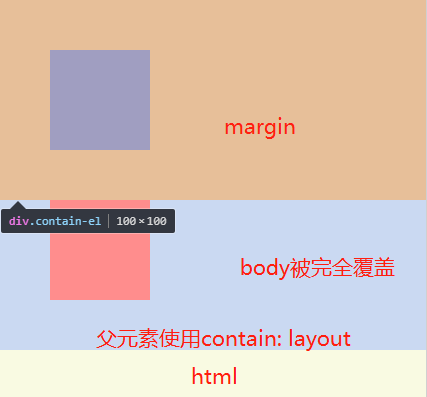
  • contain 值为 layoutcontentstrict 的元素
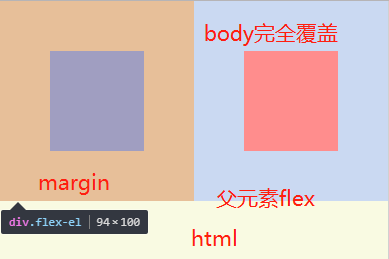
  • 弹性元素(displayflexinline-flex元素的直接子元素)
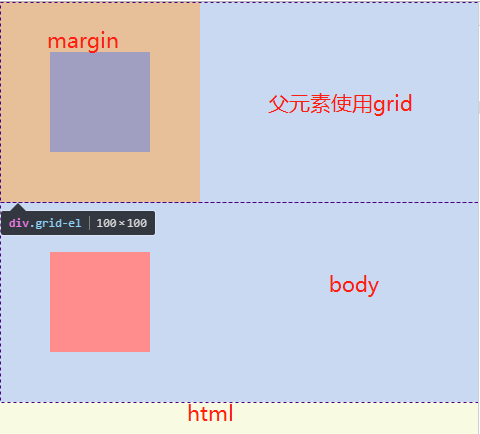
  • 网格元素(displaygridinline-grid 元素的直接子元素)
  • 多列容器(元素的 column-countcolumn-width 不为 auto,包括 column-count1
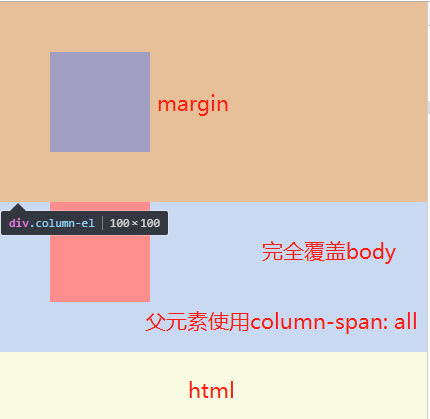
  • column-spanall 的元素始终会创建一个新的BFC,即使该元素没有包裹在一个多列容器中(标准变更,Chrome bug)

实现

html(根元素或包含根元素的元素)

1
2
3
4
5
6
7
8
9
10
11
12
13
<!DOCTYPE html><html lang="en"><head><meta charset="UTF-8"><style>
*{margin:0; padding:0;}
html{background: #f9fae2;}
body{background: #cad9f2;}
.root-bfc{
width: 100px;
height: 100px;
margin: 50px;
background: #ff8d8d;
}
</style></head><body>
<div class="root-bfc"></div>
</body></html>

019

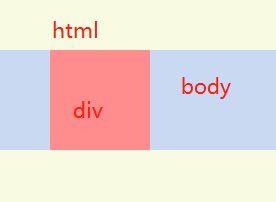
html根元素不因为内部元素的margin外溢,而body元素会外溢

float!=none(浮动元素)

1
2
3
4
5
6
7
8
9
10
11
12
13
14
15
16
17
18
19
20
21
22
23
24
25
26
27
<!DOCTYPE html><html lang="en"><head><meta charset="UTF-8"><style>
*{margin:0; padding:0;}
html{background: #f9fae2;}
body{background: #cad9f2;}
.float-wrap{
overflow: hidden;
}
.float-left{
width: 100px;
height: 100px;
margin: 50px;
background: #ff8d8d;
float: left;
}
.float-right{
width: 100px;
height: 100px;
margin: 50px;
background: #ff8d8d;
float: right;
}
</style></head><body>
<div class="float-wrap">
<div class="float-left"></div>
<div class="float-right"></div>
</div>
</body></html>

020

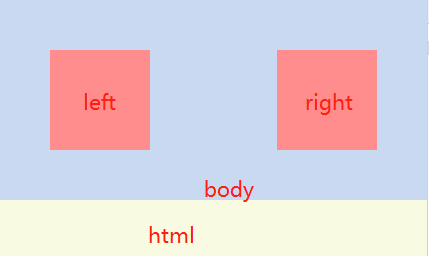
添加float之后会产生浮动脱离文档流,这时根据需要在外层清除浮动;如果在body元素清除浮动,overflow以外的方法都可以使用

position=absolute、fixed(绝对定位元素)

1
2
3
4
5
6
7
8
9
10
11
12
13
14
15
16
17
18
19
20
21
22
23
24
25
26
27
28
29
30
<!DOCTYPE html><html lang="en"><head><meta charset="UTF-8"><style>
*{margin:0; padding:0;}
html{background: #f9fae2;}
body{background: #cad9f2;}
.position-wrap{
}
.position-absolute{
width: 100px;
height: 100px;
margin: 50px;
background: #ff8d8d;
position: absolute;
top: 10px;
left: 10px;
}
.position-fixed{
width: 100px;
height: 100px;
margin: 50px;
background: #ff8d8d;
position: fixed;
right: 10px;
top: 10px;
}
</style></head><body>
<div class="position-wrap">
<div class="position-absolute"></div>
<div class="position-fixed"></div>
</div>
</body></html>

021

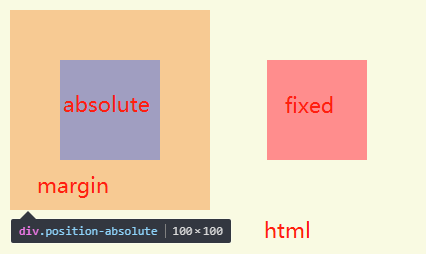
定位之后margin不会消失,但是会脱离文档流

如果不加位置数据,同样可以实现bfc,后续内容要使用margin-top撑开,等其他方法

display=inline-block(行内块级元素)

1
2
3
4
5
6
7
8
9
10
11
12
13
14
15
16
17
18
<!DOCTYPE html><html lang="en"><head><meta charset="UTF-8"><style>
*{margin:0; padding:0;}
html{background: #f9fae2;}
body{background: #cad9f2;}

.inline-block-el{
width: 100px;
height: 100px;
margin: 50px;
background: #ff8d8d;
display: inline-block;
}
</style></head><body>
<div class="inline-block-wrap">
<div class="inline-block-el"></div>
</div>
</body></html>

022

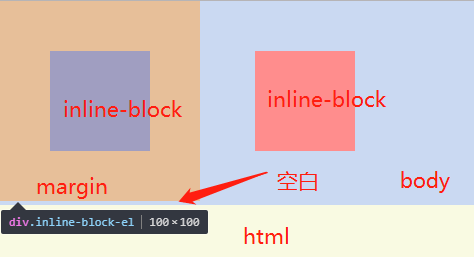
display: inline-block使用后margin不会穿透父元素,同时还需要解决如果两个inline-block在同一行,会有元素之间有空隙、元素上浮无法对齐的问题;
也可以作用在父元素上面,子元素margin属性不会穿透父元素,父元素也可能遇到上面两个问题;

display=table-cell(表格单元格)

1
2
3
4
5
6
7
8
9
10
11
12
13
14
15
16
17
18
19
20
<!DOCTYPE html><html lang="en"><head><meta charset="UTF-8"><style>
*{margin:0; padding:0;}
html{background: #f9fae2;}
body{background: #cad9f2;}

.table-cell-wrap{
display: table-cell;
}
.table-cell-el{
width: 100px;
height: 100px;
margin: 50px;
background: #ff8d8d;
}
</style></head><body>
<div class="table-cell-wrap">
<div class="table-cell-el"></div>
</div>
</body></html>

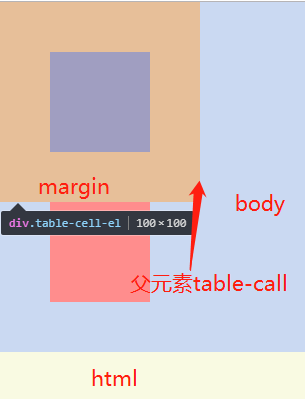
023

在父元素使用作为一个表格单元格,子元素margin属性不会穿透父元素;

display=table-caption(表格标题)

1
2
3
4
5
6
7
8
9
10
11
12
13
14
15
16
17
18
19
20
<!DOCTYPE html><html lang="en"><head><meta charset="UTF-8"><style>
*{margin:0; padding:0;}
html{background: #f9fae2;}
body{background: #cad9f2;}

.table-caption-wrap{
display: table-caption;
}
.table-caption-el{
width: 100px;
height: 100px;
margin: 50px;
background: #ff8d8d;
}
</style></head><body>
<div class="table-caption-wrap">
<div class="table-caption-el"></div>
</div>
</body></html>

024

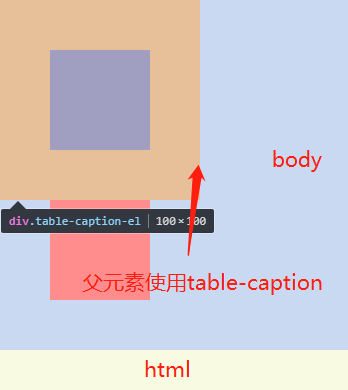
在父元素使用作为一个表格标题显示,子元素margin属性不会穿透父元素;

display=some value(匿名表格单元格元素)

元素的 displaytabletable-rowtable-row-grouptable-header-grouptable-footer-group(分别是HTML table、row、tbody、thead、tfoot的默认属性)或 inline-table

  • tabletable-rowtable-row-grouptable-header-grouptable-footer-group 的用法同table-caption,需要使用在父元素子元素才不会穿透父元素
  • inline-table 的用法同 inline-block

overflow!=visible

1
2
3
4
5
6
7
8
9
10
11
12
13
14
15
16
17
18
19
20
21
22
23
24
25
26
27
28
29
<!DOCTYPE html><html lang="en"><head><meta charset="UTF-8"><style>
*{margin:0; padding:0;}
html{background: #f9fae2;}
body{background: #cad9f2;}

.overflow-wrap--auto{
overflow: auto;
}
.overflow-wrap--hidden{
overflow: hidden;
}
.overflow-wrap--overlay{
overflow: overlay;
}
.overflow-wrap--scroll{
overflow: scroll;
}
.overflow-el{
width: 100px;
height: 100px;
margin: 50px;
background: #ff8d8d;
}
</style></head><body>
<div class="overflow-wrap overflow-wrap--auto">
<div class="overflow-el"></div>
</div>
</body></html>

025

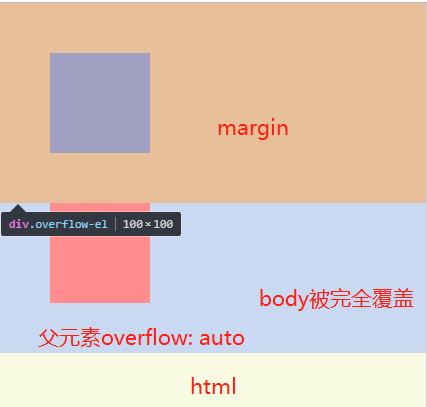
  • overflow属性为auto hidden overlay scroll 时触发bfc,其子元素margin不会穿透
  • 如果父元素为四个值时,当前元素可使用inherit

display=flow-root

1
2
3
4
5
6
7
8
9
10
11
12
13
14
15
16
17
18
19
20
21
22
23
24
<!DOCTYPE html><html lang="en"><head><meta charset="UTF-8"><style>
*{margin:0; padding:0;}
html{background: #f9fae2;}
body{background: #cad9f2;}

.flow-root-el{
width: 100px;
height: 100px;
margin: 50px;
background: #ff8d8d;
}
.clearfix{
display: flow-root;
}
@supports not (display:flow-root) {
.clearfix::after{content:" "; display:block; clear:both; visibility:hidden; height:0}
.clearfix{zoom:1}
}
</style></head><body>
<div class="flow-root-wrap clearfix">
<div class="flow-root-el"></div>
</div>
</body></html>

026

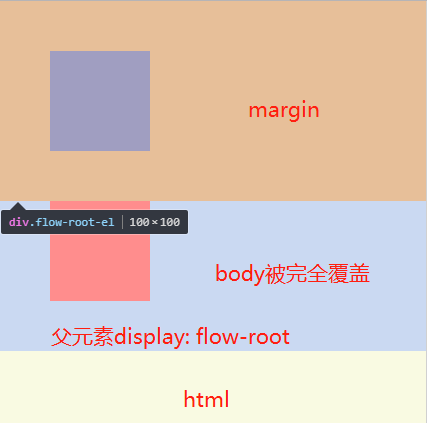
display: flow-root只支持Firefox 53+、Chrome 58+、Opera 45+,通过@supports能支持Edge

contain=layout、content、strict

1
2
3
4
5
6
7
8
9
10
11
12
13
14
15
16
17
18
19
20
<!DOCTYPE html><html lang="en"><head><meta charset="UTF-8"><style>
*{margin:0; padding:0;}
html{background: #f9fae2;}
body{background: #cad9f2;}

.contain-wrap{
contain: layout;
}
.contain-el{
width: 100px;
height: 100px;
margin: 50px;
background: #ff8d8d;
}
</style></head><body>
<div class="contain-wrap">
<div class="contain-el"></div>
</div>
</body></html>

027

contain 属性允许开发者声明当前元素和它的内容尽可能的独立于 DOM 树的其他部分。

其中layout、content、strict 可触发BFC

display=flex、inline-flex(弹性元素)

1
2
3
4
5
6
7
8
9
10
11
12
13
14
15
16
17
18
19
20
<!DOCTYPE html><html lang="en"><head><meta charset="UTF-8"><style>
*{margin:0; padding:0;}
html{background: #f9fae2;}
body{background: #cad9f2;}

.flex-wrap{
display: flex;
}
.flex-el{
width: 100px;
height: 100px;
margin: 50px;
background: #ff8d8d;
}
</style></head><body>
<div class="flex-wrap">
<div class="flex-el"></div>
</div>
</body></html>

028

当为inline-flex时遇到的问题同inline-block

display=grid、inline-grid(网格元素)

1
2
3
4
5
6
7
8
9
10
11
12
13
14
15
16
17
18
19
20
<!DOCTYPE html><html lang="en"><head><meta charset="UTF-8"><style>
*{margin:0; padding:0;}
html{background: #f9fae2;}
body{background: #cad9f2;}

.grid-wrap{
display: grid;
}
.grid-el{
width: 100px;
height: 100px;
margin: 50px;
background: #ff8d8d;
}
</style></head><body>
<div class="grid-wrap">
<div class="grid-el"></div>
</div>
</body></html>

029

当为inline-grid时遇到的问题同inline-block

column-count、column-width!=auto(多列容器)

元素的 column-count 或 column-width 不为 auto,包括 column-count 为 1

1
2
3
4
5
6
7
8
9
10
11
12
13
14
15
16
17
18
19
20
21
<!DOCTYPE html><html lang="en"><head><meta charset="UTF-8"><style>
*{margin:0; padding:0;}
html{background: #f9fae2;}
body{background: #cad9f2;}

.column-wrap{
column-width: 200px;
column-count: 2;
}
.column-el{
width: 100px;
height: 100px;
margin: 50px;
background: #ff8d8d;
}
</style></head><body>
<div class="column-wrap">
<div class="column-el"></div>
</div>
</body></html>
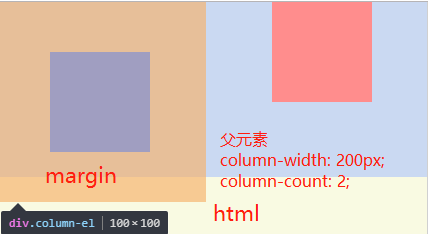
030

虽然截图中margin超出body边界,实际情况确是没有。

columns的使用方法见文末参考

column-span=all

1
2
3
4
5
6
7
8
9
10
11
12
13
14
15
16
17
18
19
20
<!DOCTYPE html><html lang="en"><head><meta charset="UTF-8"><style>
*{margin:0; padding:0;}
html{background: #f9fae2;}
body{background: #cad9f2;}

.column-span-wrap{
column-span: all;
}
.column-span-el{
width: 100px;
height: 100px;
margin: 50px;
background: #ff8d8d;
}
</style></head><body>
<div class="column-span-wrap">
<div class="column-span-el"></div>
</div>
</body></html>

031

添加之后我行为异常

总结

触发BFC主要有一些几个元素

  • 根元素:HTML
  • float:不为none
  • position:absolute、fixed
  • display:inline-block、table、table-cell、table-caption、table-row、table-row-group、table-header-group、table-footer-group、inline-table、flow-root、flex、inline-flex、grid、inline-grid
  • contain:layout、content、strict
  • overflow:不为visible
  • columns、column-count、column-width、column-span

应用场景

BFC的应用场景主要有一下几个方面,这里不做展开讨论,将单独写文章

参考

https://developer.mozilla.org/en-US/docs/Web/Guide/CSS/Block_formatting_context
https://developer.mozilla.org/zh-CN/docs/Web/Guide/CSS/Block_formatting_context
https://www.w3.org/TR/CSS21/visuren.html#block-formatting
https://drafts.csswg.org/css-display/#block-formatting-context
https://blog.csdn.net/woshinannan741/article/details/51113612

https://developer.mozilla.org/en-US/docs/Web/CSS/display
https://www.w3cplus.com/css3/display-flow-root.html
https://developer.mozilla.org/zh-CN/docs/Web/CSS/contain
https://developer.mozilla.org/zh-CN/docs/Web/CSS/columns
https://www.cnblogs.com/xinjie-just/p/5953386.html

https://www.cnblogs.com/chen-cong/p/7862832.html
https://www.w3cplus.com/css/understanding-css-layout-block-formatting-context.html